Key takeaways
- How to run a board meeting well comes down to four mechanics: a prepared agenda, confirmed quorum, a structured motion-and-vote process, and minutes that get formally reviewed and approved.
- Quorum is set by your bylaws, not Robert’s Rules itself. Confirm your specific threshold before the meeting starts.
- A typical debatable main motion is made, seconded, stated by the chair, debated, and then put to a vote. Skipping the second or the vote is a common procedural mistake.
- Minutes from the previous meeting get reviewed and approved, often with corrections, at the start of the next one – “assign a note-taker” is only step one.
- Board portal features like agenda builders, quorum/vote tracking, and minutes tools address several of these mechanics at once, covered further down.
Running a nonprofit board meeting comes down to four mechanics: a prepared agenda, a confirmed quorum, a structured process for making and voting on motions, and minutes that get reviewed and formally approved. Skip any one of these, and a meeting either stalls or produces decisions nobody can point back to later.
Disorganized agendas, information overload, lack of engagement, and ineffective documentation often get in the way, derailing discussions and draining momentum – and that’s before accounting for how to run a nonprofit board meeting when nobody on the board has a parliamentary-procedure background in parliamentary procedure. This guide walks through both: the plain-English mechanics of quorum, motions, and minutes, and the practical prep work that keeps a meeting on track.
With our detailed insights on top board meeting software solutions, you’ll also be able to compare nonprofit board portals and find the tool that actually supports these mechanics, not just a video-call window.
HOW TO RUN BOARD MEETINGS
THAT GET RESULTS?
Simplify every step of your meetings with Ideals Board
Visit websiteBefore we start: What is board meeting software?
Virtual board meeting software is an online platform that enables board members to hold meetings remotely. Used by corporate organizations, nonprofits, and government agencies, this software facilitates collaboration through video conferencing, document sharing, analytics, and voting tools.
Next, we’ll explore nonprofit board roles, how they contribute to meetings, and how board portals can change their work.
Board meeting: participants and roles
Board chair
A board chair leads the board’s governance work, facilitates strategic oversight, and helps ensure the organization advances its mission. The chair also supports financial oversight and board involvement in fundraising while working closely with the chief executive.
During board meetings, board chairs provide key updates, present strategic recommendations, and facilitate discussions.
How do board chairs use board portals?
- Share plans, reports, and meeting agendas
- Streamline the voting process
- Organize and schedule virtual meetings
Non-executive director
A non-executive board member doesn’t get involved in day-to-day operations and doesn’t hold staff or managerial positions. They maintain an objective perspective and ensure that the board chair, staff, and volunteers act in the best interests of the organization and its stakeholders.
During board meetings, non-executives provide independent oversight and contribute to strategic discussions by asking probing questions and ensuring decisions align with long-term goals.
How do non-executives use board portals?
- Review meeting agendas and documents for independent analysis
- Submit comments and feedback on meeting materials
- Track key decisions made during meetings
Board members
Board members are key participants in the governance of a nonprofit organization. The board should include members with the skills, experience, and perspectives needed to govern effectively and represent the organization’s broader community and stakeholders.
During board meetings, board members actively participate in discussions, providing their expertise and input on strategic and operational matters.
How do board members use board portals?
- Access agendas and documents in one place
- Receive real-time updates on changes to meeting details and new uploads
- Use secure messaging
With all roles defined, our next focus is on how board members can best prepare for meetings, ensuring that discussions are effective and decisions are well-informed, with board portals providing easy access to all documentation and participants.
| Role | Responsibilities | Board meeting contributions | Use of board portals |
|---|---|---|---|
| Executive director | Develops strategy, oversees operations, supports staff and volunteers, manages budget and fundraising, and collaborates with the board. | Provides key updates, presents strategic recommendations, and facilitates discussions. | Shares plans, reports, and meeting agendas; streamlines the voting process; organizes and schedules meetings |
| Non-executive director | Provides independent oversight, ensures alignment with the nonprofit’s mission, and identifies potential issues. | Offers objective insights, asks probing questions, and ensures decisions align with long-term goals. | Reviews meeting agendas and documents for analysis; submits comments and feedback; tracks key decisions made during meetings |
| Board members | Participate in governance, represent internal and external stakeholders, and provide expertise on strategy and operations. | Actively contribute to discussions and provide input on strategic and operational matters. | Access agendas and documents in one place; receive real-time updates on changes; use secure messaging |
Preparing for a nonprofit board meeting
Nonprofit board meeting preparation is one of the most important parts of board meetings. If everything is organized and easy to access, everyone can get ready at their own pace and arrive already aware of the updates.
To get your board portal and the members of the board ready for a discussion, you need to do the following:
- Organize issues and upload the supporting materials to ensure all relevant information is available for review before the meeting
- Publish required documents to guarantee board members have the necessary materials to make informed decisions
- Create drafts of decisions to streamline the decision-making process by providing a starting point for discussion
- Manage access permissions of members to ensure that only authorized individuals can view or modify sensitive information on your board portal
- Create and send invitations if needed to confirm attendance and ensure all members are informed and prepared in advance
- Create individual agenda items when required to keep the meeting focused and ensure all important topics are addressed
- Confirm your bylaws’ quorum requirement so you know exactly how many members need to be present before the meeting can officially conduct business – this sets up everything covered further down.
Now that you know how to prepare for a nonprofit board meeting, we’ll discuss creating the agenda, a key element to keeping a meeting focused and productive.
Creating an effective board meeting agenda
If you know how to create a board meeting agenda effectively, you are more likely to maximize productivity, keep discussions on track, and ensure every board member is well prepared. Without it, meetings become disorganized, leading to confusion or missed opportunities.
The key components of an effective board agenda include the following:
- Call to order. Officially begins the meeting.
- Approval of minutes. Confirms and approves the meeting minutes from the previous board meeting.
- Reports. Provide updates from the board chair, committees, and other key members.
- Discussions. Allows board members to discuss key topics and concerns.
- Action items. List decisions and actions that need to be addressed.
- Adjournment. Officially ends the meeting and confirms the next steps.
How can virtual boardrooms help with agenda building?
The software allows organizers to upload, share, and update documents quickly and safely. It ensures all members receive the agenda on time and have easy access to necessary materials.
Here’s what that looks like in practice, using a fictional small nonprofit – Riverbend Community Literacy Council – as an example:
| RIVERBEND COMMUNITY LITERACY COUNCIL Board of Directors Meeting Agenda Date: [Date] | Time: 6:00–7:30 PM | Location: [Virtual/In-person] 1. Call to order & roll call (6:00–6:05) 2. Approval of agenda (6:05–6:10) 3. Approval of minutes from [previous date] (6:10–6:15) 4. Executive director’s report (6:15–6:30) 5. Treasurer’s report / financial review (6:30–6:45) 6. Committee reports (6:45–7:00) Fundraising committee Program committee 7. Old business (7:00–7:10) – follow-up: volunteer training program vote 8. New business (7:10–7:25) – motion: approve FY27 budget 9. Announcements & other business (7:25–7:28) 10. Adjournment (7:28–7:30) |
Use this as a starting structure and adjust the time blocks to fit your own board’s typical meeting length. For a fully blank, downloadable version, use our nonprofit board meeting agenda template.
Running the meeting step by step – quorum, motions, and minutes
For anyone asking how to conduct a board meeting, the process comes down to six moments: confirming quorum, calling the meeting to order, approving the agenda and prior minutes, hearing reports, working through old and new business, and formally closing.
The same sequence provides a practical framework for how to run a board of directors meeting without making parliamentary procedure unnecessarily complicated.
1. Confirm quorum
Quorum is the minimum number of members who must be present for the board to legally conduct business, set by your own bylaws – not by Robert’s Rules itself. If your bylaws are silent on the number, Robert’s Rules defaults to a simple majority of the membership. The chair or secretary confirms a quorum by roll call before any business begins; without a quorum, the board can only adjourn, recess, or set a new meeting time.
2. Call the meeting to order
The chair calls the meeting to order at the scheduled time, once quorum is confirmed – a single sentence (“I call this meeting to order”) is enough to move the room from informal chat to official business.
3. Approve the agenda and prior minutes
The board adopts the proposed agenda as circulated or amends it before adoption, establishing the meeting’s order of business. Immediately afterward, the chair asks whether there are corrections to the previous meeting’s minutes; once corrected, if needed, the minutes are approved and become the official record.
4. Hear reports
Committee chairs, the executive director, and the treasurer present updates in the order set by the agenda. Reports are typically received for information rather than voted on, unless they include a specific recommendation the board needs to act on.
5. Work through old business, new business, and other business
Unfinished business and general orders cover qualifying matters carried over from a previous meeting, including certain postponed or previously pending items. New business covers items being raised for the first time. Other business is a catch-all for anything that doesn’t fit either category, often brief announcements.
Each substantive item that needs board action moves through the motion process: a member makes a motion, another seconds it, the chair opens the floor for discussion, then calls the vote. Who does what at each step:
| Step | What happens | Who’s responsible |
|---|---|---|
| 1. Motion made | A member proposes a specific action (“I move that…”) | Any board member |
| 2. Motion seconded | Another member indicates support so the motion can be discussed | Any other board member |
| 3. Discussion | The chair opens the floor; members debate the motion’s merits | Chair facilitates; all members participate |
| 4. Vote called | The chair restates the motion and calls for a vote | Chair |
| 5. Result announced | The chair states whether the motion passed or failed | Chair |
| 6. Minutes recorded | The motion and its disposition are recorded; vote counts are included when required or when a counted vote is taken | Secretary / note-taker |
If a board can’t reach quorum in person, some organizations fall back on board voting by email for specific, time-sensitive decisions – check your bylaws first, since not every governing document permits it.
6. Close the meeting
Once the agenda is exhausted, a member moves to adjourn, another seconds it, and the chair confirms the meeting is closed. The secretary’s draft minutes will follow the same approval process at the start of the next meeting.
For the fuller procedural detail behind each of these steps, see robertsrules.org’s introduction to parliamentary procedure or BoardSource’s own guidance on board meeting minutes.
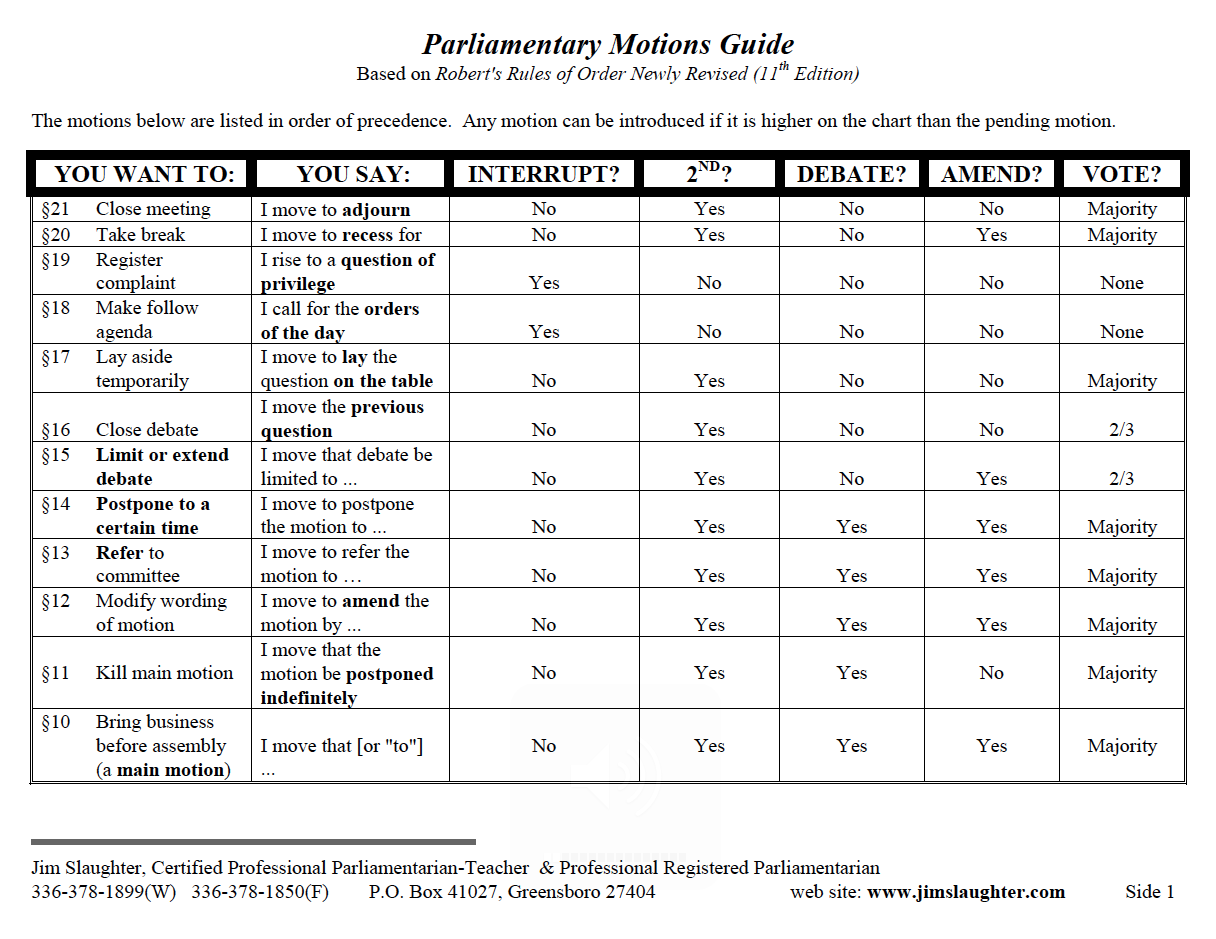
Together, these steps explain how to hold a board of directors meeting from the formal call to order through adjournment and approval of the meeting record.
Running the nonprofit board meeting (facilitation tips)
Running a nonprofit board meeting efficiently requires preparation, clear facilitation, and disciplined follow-up. The following nonprofit board meeting best practices help keep discussions focused, give members time to contribute, and ensure decisions lead to clear next steps.
The following techniques from our experts can make meetings a powerful tool for your success:
Send out the agenda early
An agenda sets the tone for a smooth board meeting. It ensures that important topics are covered, especially when meetings happen infrequently. Include key reports and financial statements, and tackle critical items early while members are most engaged.
Note: Consider incorporating a consent agenda for routine, non-controversial items, letting them be approved without discussion. BoardSource recommends this specifically to free up meeting time for strategic, generative discussion instead.
Start and end on time
Be realistic about the duration, setting clear expectations for time commitments. If meetings feel too long, consider meeting more frequently for shorter sessions. Appoint a timekeeper to monitor the agenda and keep the group on track.
Implement Robert’s Rules of Order
Robert’s Rules of Order maintain structure and fairness in board discussions, and the section above walks through exactly how the mechanics of quorum, motions, and minutes work in practice. At a high level, Robert’s Rules of Order exist to ensure the loudest voice in the room doesn’t automatically win and that every member gets a fair, orderly chance to be heard.
Assign a responsible note-taker
Accurate meeting minutes hold members accountable and track progress. A dedicated note-taker frees the chair to focus on leading the meeting. Also, good minutes eliminate the need for lengthy recaps and serve as a helpful reference for the next board meeting.
Focus on strategy
Board meetings should center on strategic planning, not routine updates. So, keep discussions aligned with the organization’s long-term goals and mission to drive meaningful impact.
Clarify roles and responsibilities
Clearly defined roles improve accountability and engagement. Assigning specific members to lead projects ensures tasks are completed efficiently and on time.
Give everyone a chance to speak
Equal participation makes for a balanced conversation. While some members may dominate, it is essential to invite quieter voices. Encourage input from all members to ensure diverse perspectives and promote a collaborative environment.
Knowing how to lead a board meeting streamlines operations and strengthens the board’s effectiveness. Thus, members contribute meaningfully and collaborate toward achieving the organization’s goals.
Following up after the board meeting
Following up after a board meeting is crucial for maintaining momentum and accountability. Proper documentation and clear communication ensure that decisions are effective and no details are overlooked, including nonprofit board meeting minutes.
Here is a board meeting follow-up checklist:
- Notify and remind team members about assigned tasks and deadlines
- Record and publish milestones to track progress
- Keep track of actions taken on previous decisions to ensure follow-through
- Facilitate communication through integrated chats and comments
- Store all information in a single secure repository for easy access
Board rooms streamline the follow-up process by providing a central platform where directors can track tasks, decisions, and progress. In addition, board rooms help maintain transparency and accountability by storing all meeting materials and communications in one place.
Common challenges in running a non-profit board meeting
Effective nonprofit board meetings are essential for steering an organization forward, but challenges such as lack of engagement, compliance issues, and time management can hinder them.
- Engage board members. Share agendas and reports in advance via a board portal so members arrive prepared. Encourage active participation with built-in discussion forums and voting tools.
- Stay on top of compliance. Use board portal software to centralize policies, bylaws, and governance records, helping the board follow established legal and organizational requirements.
- Make every minute count. Automate administrative tasks, eliminate unnecessary paperwork, and centralize access to board meeting minutes and action items.
The right strategies and governance tools, including board portals, turn board meetings from time-consuming obligations into powerful decision-making sessions.
Tools to help run successful board meetings
Board portal software simplifies meeting prep, ensuring efficiency, transparency, and better decision-making than good intentions alone.
Why use board portal software?
- Accelerate meetings. A virtual boardroom allows everyone to prepare for a meeting in advance, so the team doesn’t waste time on updates.
- Keep everything on track. Board meeting software allows recording and storing meeting minutes and key ideas.
- Create tasks. Using an electronic boardroom, members can create tasks, assign and monitor them during or right after the meeting.
- Hold online meetings. Board portal software makes it easy for remote members to attend board meetings and access all required information.
- Improve communication. Thanks to built-in chat in a virtual boardroom, it’s easy for directors to communicate between meetings.
For organizations that need a secure online voting system for nonprofit board decisions, a board portal can centralize voting alongside agendas, supporting documents, meeting records, and access permissions. This is particularly useful when directors cannot all participate in person.
For virtual board meetings, nonprofit boards should also confirm that remote participation, voting, document access, and approval processes comply with their bylaws and applicable legal requirements.
How can board portal software benefit nonprofit teams?
Nonprofit boards and committees
- Strengthen board governance and accountability
- Ensure complete transparency in decision-making
- Foster continuous communication for more effective board meetings
Nonprofit executive teams
- Streamline meeting preparation with centralized access to data
- Assign, track, and follow up on action items to ensure execution
Nonprofit operations and program teams
- Respond quickly to critical issues and organizational needs
- Track project progress and assigned responsibilities in real-time
Which board portals actually help you run better meetings
If you’re asking which specific tool would make agenda-building, quorum tracking, or minutes easier, here’s how four nonprofit-focused board portals compare on exactly those mechanics.
| Board portal | Agenda-building tools | Quorum / voting tools | Minutes tools | Best for |
|---|---|---|---|---|
| Ideals Board | Template-based agenda builder with per-item time allocations and auto-formatted distribution | Automatic quorum calculation, online voting on resolutions, plus circular resolutions, surveys, and e-signatures | AI-generated draft minutes pulled from meeting recordings (captures decisions, action items, dissents), with director review and approval | Public companies, PE-backed enterprises, and nonprofit boards wanting an AI-assisted, full board-meeting-lifecycle platform |
| Aprio | Agenda Builder with reusable templates | Digital voting and approvals with audit trails | Minutes Builder can start a draft from the meeting agenda | Nonprofit boards wanting a simple, guided meeting workflow |
| iBabs | Pre-built agenda templates; drag-and-drop meeting packs | RSVP/attendance tracking for quorum; manual, live, anonymous, or weighted voting | Minutes created and exported in-platform, with action tracking | Boards that want a structured, script-style meeting flow |
| BoardEffect | AI-generated agendas via Book Builder | Built-in e-voting from any location | AI Smart Minutes turns notes/transcripts into formatted minutes | Nonprofit boards, community & volunteer boards |
| Boardable | Centralized agenda, document, and communication hub | Built-in voting and polling | AI-generated minutes and summaries (Professional+ tier) | Small-to-mid nonprofits and committees |
None of these is universally “best” – the right fit depends on how formal your board’s procedure needs to be, how much of the minutes process you want automated versus reviewed by hand, and your budget. All four are worth a closer look against your own board’s actual meeting flow.
WANT LESS PREP TIME AND
MORE PRODUCTIVE MEETINGS?
Streamline meeting workflows with Ideals Board
Visit websiteHow do volunteer boards streamline meeting preparation?
For volunteer-led boards, the biggest gains usually come from centralizing agendas, board packs, comments, and meeting updates in one place. Board portals reduce repetitive administrative work by providing members with a single secure location to review materials before the meeting and track decisions afterward.
FAQ
Which board governance solutions support virtual meetings and e-signatures?
Many modern board governance platforms support remote meeting workflows, electronic approvals, and document-signing capabilities, although features vary by provider and plan. When comparing solutions, check whether virtual meeting access and e-signatures are built into the platform or require integration with another service.
What are the key steps to running a successful nonprofit board meeting?
A successful board meeting requires preparation, a confirmed quorum, a clear agenda, and an orderly process for discussion and decisions. The board chair calls the meeting to order, the board reviews the prior meeting minutes, reviews reports and agenda items, and takes a formal vote when a decision requires board approval. Decisions and follow-up tasks should then be documented to maintain accountability and a reliable governance record.
How long should a nonprofit board meeting last?
Most board meetings last one to two hours monthly, and can run up to a full day, focusing on strategy, fundraising, and broader organizational review. Well-planned agendas generally lead to more productive meetings and reduce unnecessary discussion.
What should be included in a nonprofit board meeting agenda?
A nonprofit board meeting agenda should include a call to order, approval of the agenda and prior minutes, financial and committee reports, old business, new business, other business, time for questions, and adjournment.
What are the best board meeting tools for nonprofits?
A virtual board portal can be particularly suitable for nonprofits because it combines secure document sharing, agenda and minutes tools, and voting features in one place, since it combines secure document sharing, agenda and minutes tools, and voting features in one place – more efficient for governance-specific work than general tools like Google Workspace or Microsoft Teams. See the comparison above for how four nonprofit-focused options handle these mechanics specifically.
How often should a nonprofit board meet?
Most nonprofit boards meet monthly or quarterly, although the appropriate frequency depends on the organization’s size, bylaws, governance needs, and current priorities. A first board meeting or periods involving major changes, fundraising campaigns, or significant strategic decision-making may require more frequent meetings. Boards should always check their bylaws for any minimum meeting requirements.
What’s the difference between old business, new business, and other business?
Old business covers items carried over from a previous meeting that weren’t fully resolved – something tabled, postponed, or left pending a follow-up. New business covers items raised for the first time at this meeting. Other business is a catch-all for brief items, like announcements, that don’t need a full agenda slot of their own.
Which board portals help with meeting agendas and minutes?
Aprio, iBabs, BoardEffect, and Boardable all include dedicated agenda-building and minutes tools, though they differ in how much of the process is automated versus manual. See the full comparison above for how each handles agenda-building, quorum/voting, and minutes specifically.